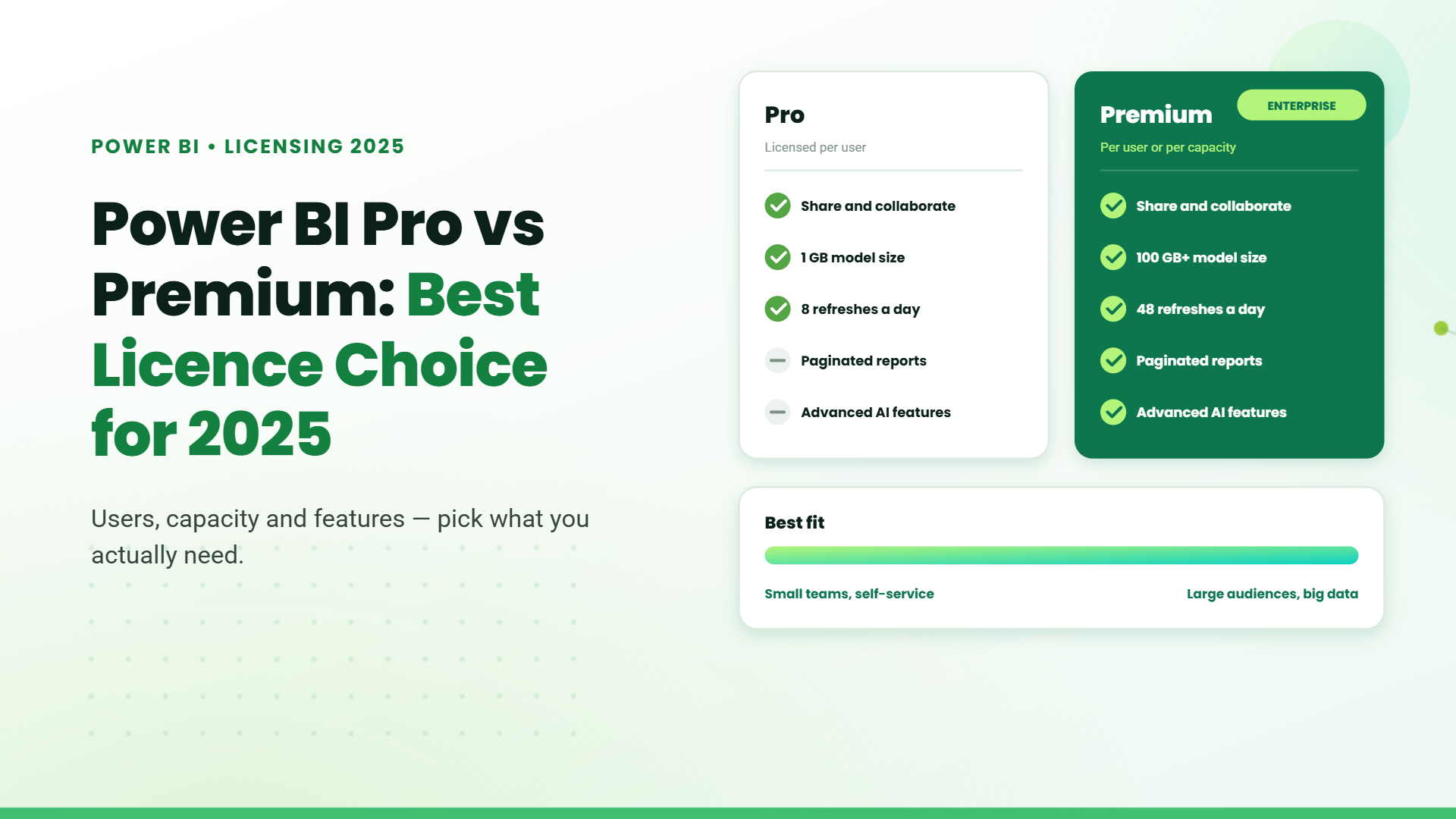
The right Power BI license has become more significant than ever, as data drives critical business decisions for over 97% of companies. A substantial difference exists between Power BI Pro and Premium licenses – Pro costs $14 per user monthly, while Premium begins at $24 per month as on April 1,2025.
Power BI Pro provides 10GB storage per user and refreshes data 8 times daily. Premium takes this further with 100TB storage capacity and 48 daily refreshes. Each license type addresses specific business requirements. Selecting an inappropriate option could result in excessive costs or restricted data analysis potential.
Our comprehensive breakdown of Pro and Premium licenses will help you make the right choice. The comparison includes storage limits, refresh rates, sharing capabilities, and AI features. This detailed analysis will guide your business decision-making process through 2025.
Power BI Pro vs Premium: Key Differences Explained for Business Owners.
When it comes to implementing Power BI effectively, selecting the right licensing option is crucial. This guide clearly explains the core differences between Power BI Pro and Power BI Premium, helping you choose the best fit for your business needs.
Understanding Power BI Licensing Options
Power BI offers four licensing options:
- Power BI Desktop (Free)
- Power BI Pro
- Power BI Premium Per User (PPU)
- Power BI Premium Per Capacity
Let’s delve deeper into how Power BI Pro compares to Power BI Premium in pricing, capabilities, and suitability for different business sizes.
Pricing Structure Comparison
Power BI Pro
- Cost: $14 per user/month
- Ideal for individuals or small teams with basic collaboration needs.
Power BI Premium
- Premium Per User (PPU): $24 per user/month (double the cost of Pro, enhanced features).
- Premium Per Capacity: Starts at $4,995 per month, ideal for large enterprises requiring dedicated resources.
Tip: Companies with over 500 content consumers typically find Premium Per Capacity more cost-effective, especially since only content creators require Pro licenses.
Quick Comparison: Pro vs Premium
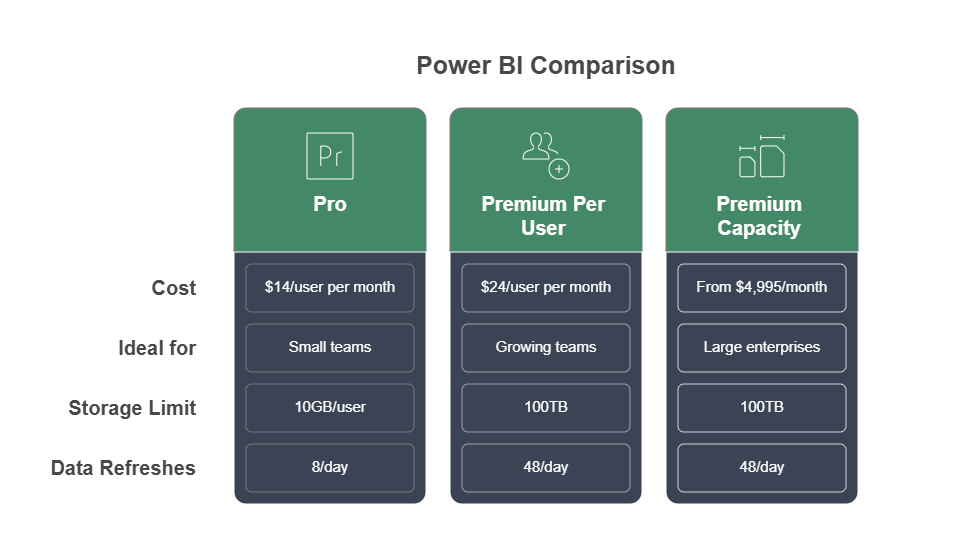
Best Power BI Option Based on Your Business Size.
| Business Type | Recommended Licensing | Reasoning |
| Freelancer/Solo Analyst | Power BI Pro | Cost-effective, meets individual needs |
| Small Business (<50 users) | Power BI Pro or PPU | Depends on collaboration and analytics complexity |
| Mid-sized (50-200 users) | PPU or Premium Capacity | Increased data usage, analytics sophistication |
| Enterprise (200+ users) | Premium Capacity | Scalability, governance, and comprehensive analytics |
| External Reporting | Premium Capacity | Allows sharing reports widely without additional licenses |
Deployment Strategies for Different License Types
Deployment flexibility emerges as a crucial factor when selecting between Power BI Pro vs Premium. Each license type supports distinct deployment architectures to match your organization’s infrastructure requirements and security needs.
1. Cloud-Only with Pro
Power BI Pro is your online workspace. Teams create and share dashboards on Microsoft’s cloud platform (powerbi.com). Even if your data lives on office servers, you can connect securely using a gateway—but reports stay in the cloud. Perfect for small businesses (under ~200 users) wanting affordable, collaborative analytics without managing servers.
2. Hybrid Power with Premium
Premium is your upgrade for big datasets and hybrid flexibility. It merges stored data (for speed) with live connections (for real-time updates). Assign Premium’s power to teams that need it most—like analysts handling 100 GB files—while others use cheaper licenses. Great for enterprises with 500+ users.
3. On-Premises Reporting
Report Server lets you host Power BI entirely in your office—no cloud. Reports stay behind your firewall for strict security. Requires buying Premium or SQL Server Enterprise licenses. Ideal for industries like banking or healthcare where data can’t leave the building.
4. When to Scale Up
Upgrade to Premium when:
- You hit ~500 users (cheaper than Pro licenses).
- Datasets exceed 1 GB or need refreshing 48x/day.
- You need AI or paginated reports.
5. Mix Licenses, Save Costs
Combine Pro (for report builders), Free licenses (for viewers), and Premium (to host shared dashboards). Example: A school uses Pro for IT staff, Free for teachers, and Premium to store student analytics.
6. Future-Proof with Fabric
Microsoft is merging Premium into Fabric—a new analytics toolkit. By 2025, Premium users must switch to Fabric licenses. Benefits include Azure cloud credits and AI tools. Regularly check if licenses are actually used to avoid overspending.
Choosing the Right Plan for Your Business
When choosing the right Power BI license for your business, consider these key factors:
1. Assess Your User Base
Determine how many users need to actively create reports versus those who primarily view reports:
- Few active creators, many viewers: Premium Capacity
- Majority creators, few viewers: Pro or PPU
2. Evaluate Data Volume and Complexity
Large datasets or complex reporting needs demand higher capacities:
- Small datasets (<1GB): Power BI Pro
- Moderate to large datasets (up to 100GB): Premium Per User
- Extremely large datasets (over 100GB) or complex operations: Premium Capacity
3. Analyze Refresh Requirements
How current must your data be?
- Standard reporting (up to 8 refreshes daily): Pro
- Frequent data updates (up to 48 refreshes daily): PPU or Premium Capacity
4. Budget and Scalability
- Small budgets or teams: Pro
- Growing teams or moderate budgets: PPU
- Large budgets, high scalability, future growth planning: Premium Capacity
5. Security and Compliance
Enterprises needing robust security, compliance, and governance typically require Premium Capacity for granular control and dedicated resources.
Using these criteria, match your organization’s specific needs with the appropriate Power BI license to ensure optimal performance, scalability, and cost efficiency.
Table of Contents
- 1. Introduction
- 2. Power BI Pro vs Premium: Key Differences Explained for Business Owners.
- 3. Understanding Power BI Licensing Options
- 4. Pricing Structure Comparison
- 5. Quick Comparison: Pro vs Premium
- 6.Best Power BI Option Based on Your Business Size.
- 7. Deployment Strategies for Different License Types
- 8. Choosing the Right Plan for Your Business
- 9. Conclusion
Talk to our Microsoft Expert Consultant
Conclusion
Your choice between Pro and Premium comes down to user count, data needs, refresh rates, and budget. Smart companies assess today’s needs—and tomorrow’s growth—before picking a plan. Pro licenses work well for small teams with simple reporting needs. Enterprises that need extensive data analysis and sharing capabilities should look at Premium’s improved features.
Smart businesses assess their current requirements and future growth path to pick the right option. A full picture of user numbers, data volumes and analytical needs helps companies select the most suitable Power BI license for their unique scenario.
Share this article

About the Author
Chandru is a technology professional experienced in business automation, Microsoft solutions, and digital transformation. Through practical insights, [he/she/they] helps businesses understand emerging technologies and achieve meaningful outcomes.
Best practice is to follow “role-based access control” (RBAC), which means giving people only the access they need to do their jobs nothing more. For SharePoint Online users, Microsoft provides additional tools like Privileged Access Management to further control and monitor administrative access.