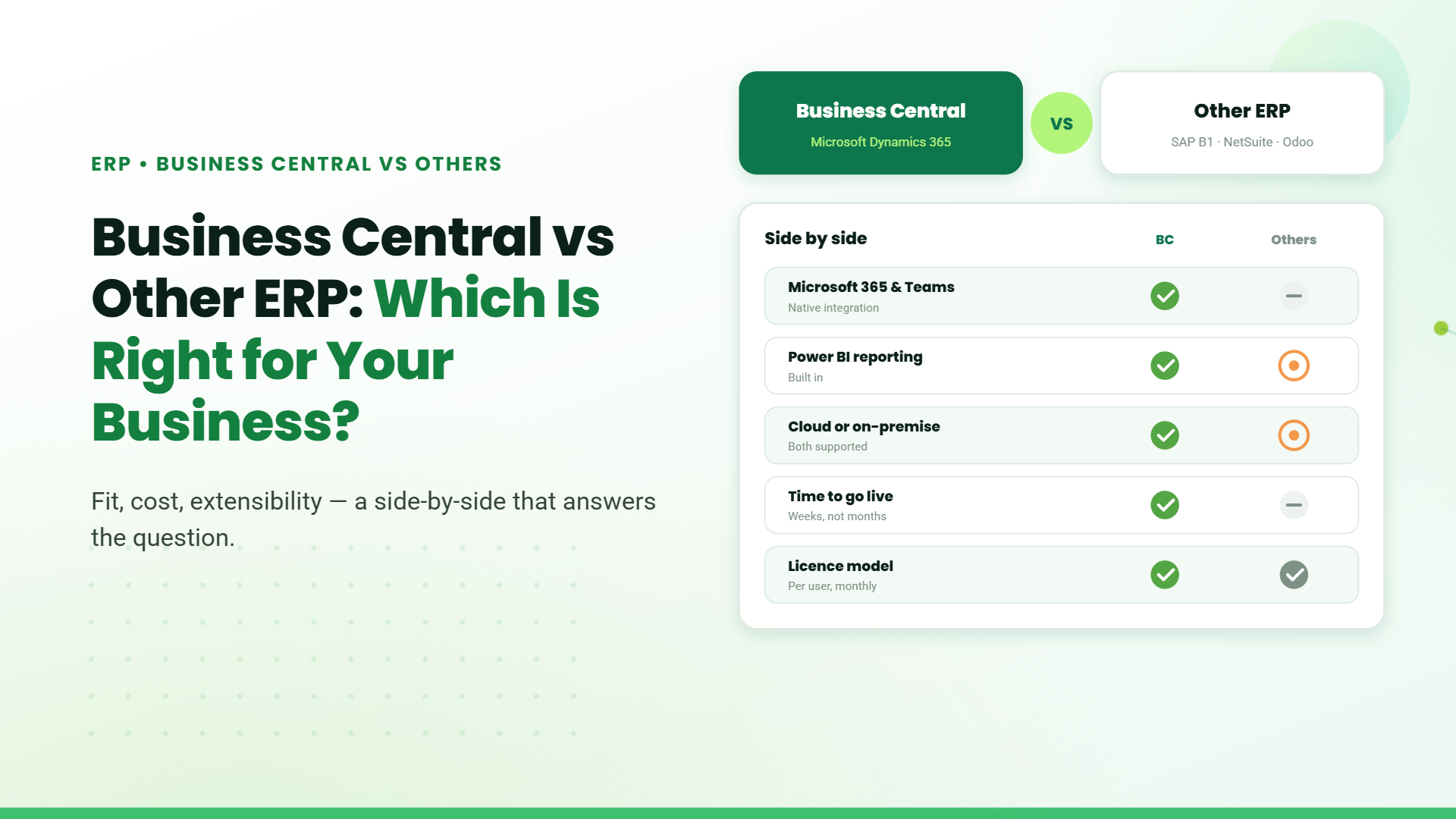
Microsoft Business Central vs Other ERP: Which Is Right for Your Business?

Microsoft Business Central vs Other ERP: Which Is Right for Your Business?

Choosing between Microsoft Dynamics 365 Business Central and Other, standalone ERP systems is one of the most critical technology decisions growing businesses face today. While legacy ERP systems like SAP S/4HANA, Oracle NetSuite, and open-source platforms dominate enterprise landscapes, Business Central has emerged as the preferred choice for small and mid-sized businesses (SMBs), delivering 172% ROI over three years with an average Net Present Value of $306,000.
The fundamental question isn’t just about features,it’s about whether you need the complexity and cost of traditional ERPs or the agility and integration of Microsoft’s modern cloud-first solution. Organizations using Business Central report 18% productivity improvements for finance and operations staff, with finance teams saving 15 hours monthly on reporting and 20 hours on VAT compliance.

Understanding Modern ERP Landscape

The Evolution from MRP to Intelligent Cloud ERP

Enterprise Resource Planning has evolved dramatically. What started as Material Requirements Planning (MRP) in the 1970s became MRP II, then ERP 1.0 with enterprise integration, then ERP 2.0 with web and cloud capabilities. Today’s ERP 3.0 systems are intelligent, modular, cloud-native platforms powered by AI, machine learning, and real-time analytics.
Modern ERPs now serve as digital cores of enterprises, connecting finance, sales, service, supply chain, and operations into unified ecosystems. The critical question for businesses is whether they need standalone, specialized systems or an integrated, cloud-first platform designed for growth.

Microsoft Business Central: The Cloud-First Alternative

What Is Business Central?

Microsoft Dynamics 365 Business Central is a cloud-based, all-in-one business management solution designed specifically for SMBs (typically 20–1,000 employees). Unlike traditional ERPs requiring years of implementation, Business Central deploys in 3-6 months and integrates seamlessly with Microsoft 365, Teams, Outlook, Excel, and Power BI.

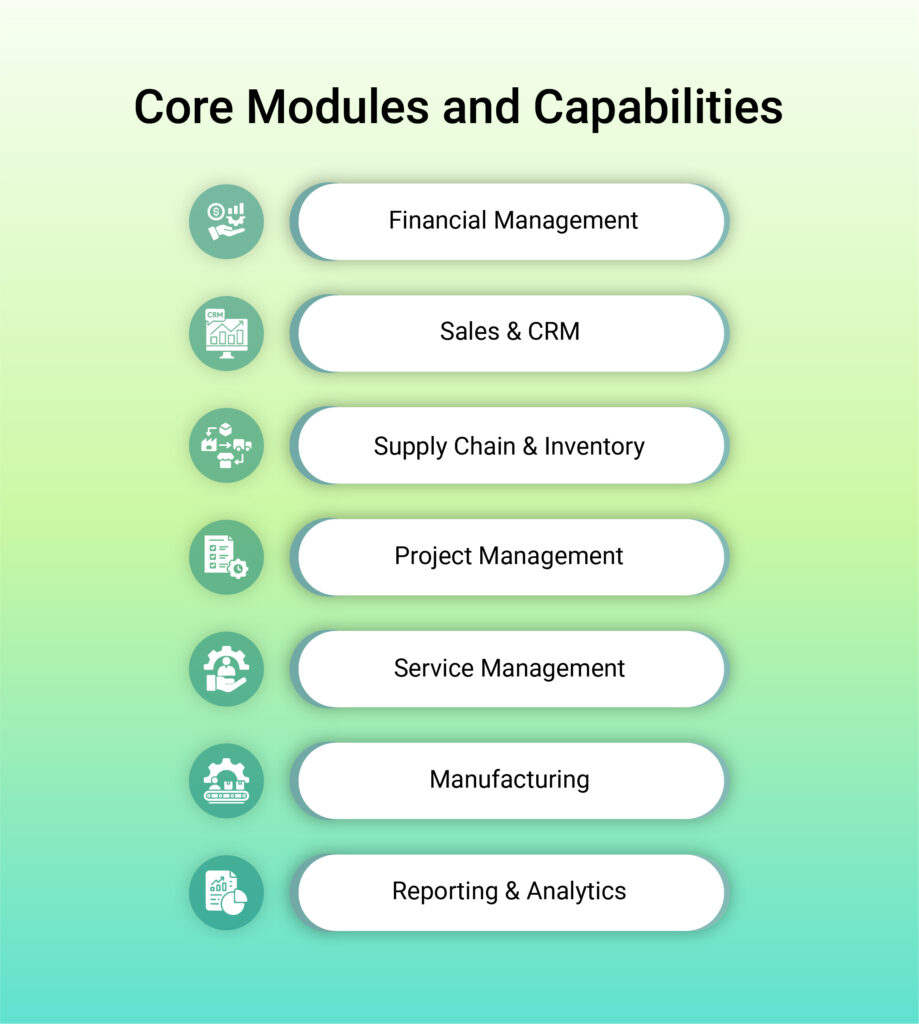
Core Modules and Capabilities

Business Central provides comprehensive functionality across nine key areas:
Financial Management – General Ledger, Accounts Payable/Receivable, cash flow, budgeting, and multi-currency consolidation
Sales & CRM – Quote-to-cash processes, customer tracking, and Outlook integration enabling email-to-order conversion
Supply Chain & Inventory – Multi-location tracking, demand forecasting, automated replenishment, and vendor management
Project Management – Resource allocation, budget tracking, and profitability analysis
Service Management – Service contracts, warranty tracking, and SLA management (Premium license)
Manufacturing – Production orders, Bill of Materials, and capacity planning (Premium license)
Reporting & Analytics – Native Power BI integration delivering real-time dashboards without additional licensing

Licensing Flexibility

Dynamics 365 Business Central is designed to fit how your people actually work. Instead of a one-size-fits-all license, Microsoft offers a role-based subscription model so each user gets the right level of access nothing more, nothing less.

Choose the right license for every role.

  1. Business Central Essentials
    Built for teams running day-to-day operations. This license supports core business functions like finance, sales, purchasing, inventory, and operations making it ideal for users who manage and execute core processes across the organization.
    Pricing: $80 per user/month, billed annually.
  2. Business Central Premium
    Designed for businesses with more complex operational needs. In addition to all Essentials capabilities, this license supports manufacturing and service management, helping organizations manage production, resources, and service delivery at scale.
    Pricing: $110 per user/month, billed annually.
  3. Business Central Team Members
    Perfect for users who need visibility and light interaction rather than full system access. Team Members can read data, approve workflows, and update selected information keeping everyone connected without unnecessary licensing costs.
    Pricing: $8 per user/month, billed annually.
  4. Free Trial
    A 30-day free trial allows teams to explore Business Central and understand how finance, sales, service, and operations come together in a single platform – before making a commi

What makes this flexible

  • Assign licenses based on actual job roles, not assumptions
  • Combine full-use and light-use licenses to control costs
  • Easily adjust licenses as teams grow or responsibilities change.
  • Predictable, subscription-based pricing with annual billing

Key Other ERP Systems Compared

To understand why Business Central resonates with SMBs, let’s examine leading alternatives:

SAP S/4HANA

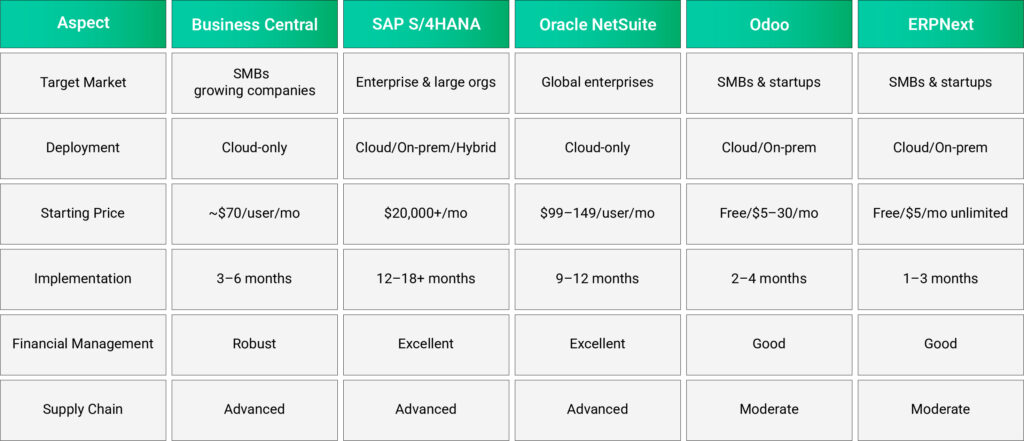
SAP S/4HANA is an enterprise-grade ERP built on SAP’s in-memory HANA platform, delivering real-time analytics and advanced automation. However, licensing and implementation costs are typically high, deployments require significant IT expertise, and the platform is primarily designed for large organizations with complex operations. For many SMBs, the overall cost, implementation effort, and system complexity often outweigh the practical benefits.

Oracle NetSuite

Suite delivers cloud-native ERP featuring sophisticated financial forecasting and multi-entity capabilities via OneWorld. Yet, it involves steep implementation expenses ($25K–$250K+), extended rollout periods (2–12 months), and per-user pricing from $99–149 monthly atop a ~$999 base fee, rendering it costly for expanding companies. Businesses note smoother scaling over time but face hurdles with upfront complexity.

Odoo ERP

Odoo provides a free open-source version with 40+ modular apps and affordable cloud options. However, it requires significant technical expertise for implementation and customization, lacks centralized support for community editions, and becomes complex as businesses scale.

ERPNext

Next delivers open-source ERP with unlimited users on Frappe Cloud hosting starting at $5/month, ideal for cost-conscious SMBs. Yet, it demands technical expertise for self-hosting, plus limited enterprise-scale features like advanced scalability for larger firms. Organizations praise low upfront costs but grapple with maintenance complexity and support gaps.

Acumatica ERP

Acumatica provides flexible cloud deployment, strong project management, and AI-powered automation. However, navigation feels clunky, implementation often requires extensive customization, and costs can become unpredictable.

Direct Comparison: Business Central vs Other ERPs
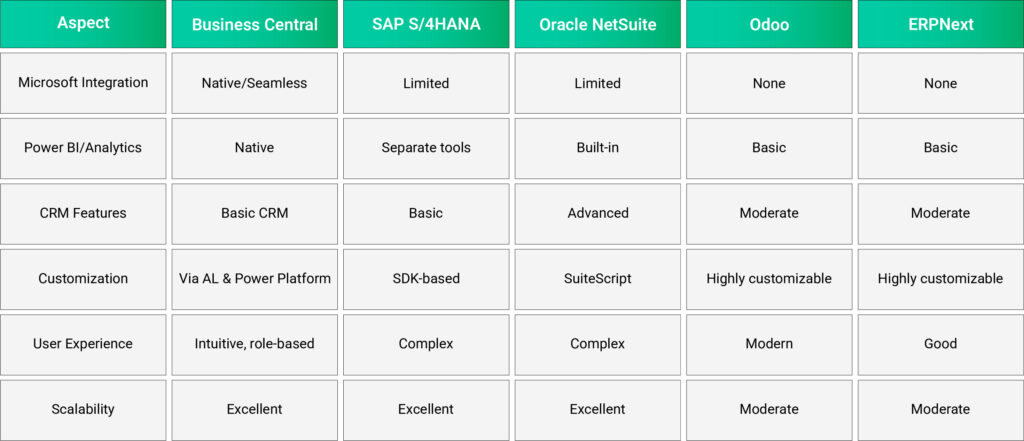
The Business Central Advantage: Why Companies Choose It

1. Seamless Microsoft Ecosystem Integration

Unlike other ERPs requiring manual data synchronization, Business Central connects natively with:
  • Microsoft 365 (Outlook, Excel, Word, SharePoint)
  • Microsoft Teams for collaborative workflows
  • Power BI for advanced analytics (included, no extra cost)
  • Power Automate for workflow automation
  • Power Apps for custom applications​
This ecosystem integration eliminates data silos and enables organizations already using Microsoft tools to deploy faster and with lower training costs.

2. Exceptional ROI and Productivity Gains

Organizations implementing Business Central achieved:
  • 172% ROI over three years with $306,000 Net Present Value
  • 15 hours monthly savings on finance reporting per staff member
  • 20 hours monthly savings on VAT reporting
  • 30% time savings for operations through automation
  • 75% reduction in time to generate sales quotes
  • 18% productivity improvement for finance and operations staff
These metrics significantly outpace industry averages for ERP implementations.

3. Rapid Implementation and Lower Costs

Business Central deploys in 3–6 months versus 12–18 months for traditional ERPs. The streamlined implementation reduces disruption and accelerates time-to-value. Additionally:
  • Cloud-based architecture eliminates hardware and infrastructure investment
  • Automatic updates from Microsoft ensure continuous security and feature improvements
  • Flexible licensing allows cost-effective scaling as business grows
  • Organizations report deployment costs 75% lower than legacy ERP alternatives​

4. Advanced AI and Automation Capabilities

Microsoft Copilot integration transforms routine tasks:
  • Invoice processing automation reducing manual data entry
  • Bank reconciliation automation saving finance teams significant time
  • Sales forecasting using historical data and current opportunities
  • Inventory optimization through demand prediction
  • Predictive analytics for proactive decision-making​

5. Real-Time Business Intelligence

Power BI integration (included at no additional cost) enables:
  • Live dashboards reflecting real-time business metrics
  • Customizable reports for different roles and departments
  • Advanced analytics using AI-powered insights
  • Predictive modeling for scenario planning
  • Collaborative analytics shared across teams​

When to Choose Business Central vs Other ERPs

Choose Business Central When:

Consider Other ERPs When:

Making Your Decision:

What is your organization size and growth trajectory?

SMBs and companies expecting to grow within Microsoft 365 ecosystem benefit most from Business Central.

Are you already invested in Microsoft technology?

Existing Microsoft 365 deployments make Business Central integration virtually seamless, reducing implementation costs by 30–40%.

What is your implementation timeline?

Businesses needing rapid deployment should choose Business Central (3–6 months) over traditional ERPs (12–18 months).

What is your total cost of ownership budget?

Cloud-based Business Central typically costs 40–50% less over five years than on-premise ERP alternatives.

How important is user adoption?

Business Central’s intuitive interface and Microsoft integration drive adoption rates 30% higher than complex traditional ERPs.

Conclusion: Business Central Wins for SMBs in 2025

The modern ERP landscape has shifted. While SAP, Oracle, and Odoo serve specific enterprise niches, Microsoft Dynamics 365 Business Central has become the clear choice for SMBs seeking an integrated, intelligent, and cost-effective business management solution.
With 172% ROI, seamless Microsoft integration, rapid deployment, and advanced AI capabilities, Business Central eliminates the complexity and cost of managing multiple disconnected systems. Organizations continue discovering that Business Central isn’t just an ERP, it’s a business accelerator enabling faster growth, better decisions, and stronger competitive positioning.
Ready to transform your business? Start by evaluating your current systems and growth needs against Business Central’s proven capabilities and ROI track record.

Frequently Asked Questions

How long does Business Central implementation take?

Typical implementation requires 3–6 months, significantly faster than traditional ERP systems requiring 12–18 months.

What is the ROI of implementing Business Central?

Organizations achieve 172% ROI over three years with average Net Present Value of $306,000.

Can Business Central handle manufacturing operations?

Yes, the Premium license includes manufacturing capabilities with production orders, Bill of Materials, and capacity planning.

How does Business Central pricing compare to NetSuite?

Business Central starts at $70/user/month (Essentials) versus NetSuite at $99–149/user/month, saving 20–50% depending on feature requirements.

Is Business Central suitable for multi-currency operations?

Yes, Business Central supports multi-currency and multi-company consolidation, making it suitable for global organizations.

Share This Post

More To Explore